
How to Export LinkedIn Connections (December 2026 Change)
November 27, 2026
TL;DR
Go to Settings, Data privacy, Get a copy of your data, pick Download larger data archive and request it. Your connections arrive as Connections.csv, usually within a day. From December 2026 LinkedIn removes your connections' current companies, job titles and emails from that file, leaving names, profile links and connection dates, so an export taken before the change is the last full snapshot you can own.
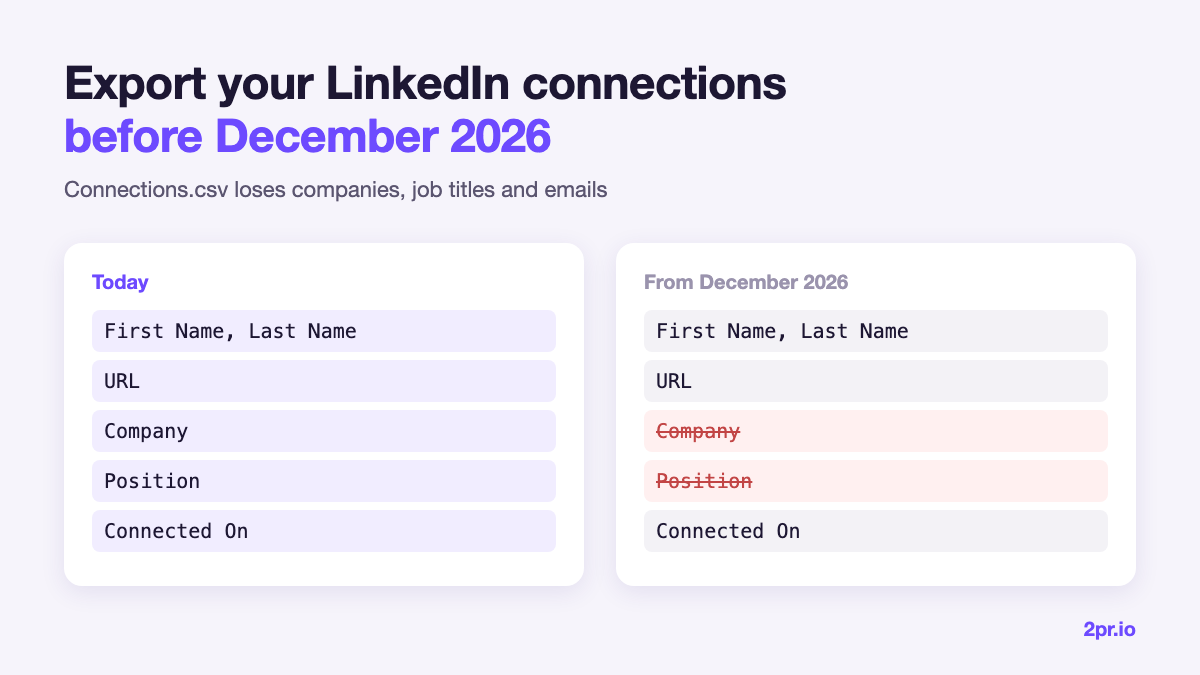
To export your LinkedIn connections, open Settings, then Data privacy, then Get a copy of your data, choose "Download larger data archive" and request it. LinkedIn emails you a ZIP with a file called Connections.csv. Until now that file listed every connection's name, profile link, company, job title and the date you connected. From December 2026, LinkedIn takes the company and job title out.
Below: the exact steps, what is in the file before and after the change, why the missing columns matter more than they look, and what to do with the export once you have it.
How to export your LinkedIn connections, step by step
- On LinkedIn, click Me, then Settings & Privacy.
- Open Data privacy, then Get a copy of your data.
- Select Download larger data archive. Do not pick individual categories: the faster, smaller download does not include your connections.
- Click Request archive.
- Wait for the email. LinkedIn says the full archive can take up to a day, and connections can take a little longer. The download link expires after a few days, so save the ZIP when it arrives.
- Unzip it and open Connections.csv in Excel or Google Sheets.
You can only export your own 1st-degree connections. There is no official way to export someone else's network, or your 2nd-degree contacts.
What changes in December 2026
LinkedIn added a one-line notice under the archive button on the download page: from December 2026, your data download no longer includes your connections' email addresses, current companies or job titles. LinkedIn has not named an exact day. Most of the coverage, including my own post, uses December 1 as the working date, so the safe move is to request your archive before the end of November.
Here is what Connections.csv contains before and after, based on the current file and on reports from people who have seen the notice:
Swipe sideways to compare
| Column | Before December 2026 | After |
|---|---|---|
| First Name, Last Name | Yes | Yes |
| URL (profile link) | Yes | Yes |
| Connected On | Yes | Yes, per early reports |
| Company | Yes | Removed |
| Position | Yes | Removed |
| Email Address | Only for connections who allowed it | Removed |
The email column was already mostly empty. Since 2018, a connection's email only appears in your export if that person allowed it, and most people never touched that setting. Company and Position are the real loss. They were the two columns that made the file searchable.
LinkedIn's help pages may still list all seven columns for a while. Trust the notice on the download page over the help article.
Why companies and job titles matter in your export
Some people argue this change does not matter because people change jobs anyway and the data goes stale. I strongly disagree. An imperfect snapshot you control is far better than relying entirely on what the platform decides to show you next quarter.
A list of 3,000 names with no company and no title is close to useless. You cannot filter it, you cannot sort it, and you cannot answer the one question that makes a network valuable: who do I know at this company?
With those two columns, the same file becomes a working tool:
- Warm intros into target accounts. Filter Company by the 20 accounts you want to sell to, hire from or partner with. In a few seconds you see who you already know there, and at what level.
- Former colleagues you have lost touch with. Filter by a past employer's name to find people you worked with years ago and never spoke to again. These are some of the warmest conversations you can start.
- A network database you own. A spreadsheet on your laptop does not change when LinkedIn redesigns the My Network page, limits search, or restricts an account.
Most people do not change jobs every month, so a November 2026 snapshot stays mostly accurate for a long time. Date the file, and treat it as a starting point you update, not a live source of truth.
What to do with the export in 15 minutes
Getting the file is the easy part. Here is a quick pass that turns it into something you will actually use:
- Save the ZIP with the date in the name, for example
linkedin-archive-2026-11.zip, somewhere backed up. This is the version with companies and titles. - Open Connections.csv in Google Sheets and delete the first few lines of notes above the header row, if your file has them.
- Turn on a filter on the header row.
- Count connections by company with a pivot table. The top 20 companies in your network are often not the ones you would guess.
- Filter Position for the titles you care about, such as "Founder", "Head of", "VP" or "Partner".
- Sort by Connected On and look at people you connected with 3 to 5 years ago. Pick five and send a short, specific note.
That last step is where the export pays for itself. A file nobody opens is just a backup.
What else is in your LinkedIn data archive
The larger archive holds more than connections. It also includes a newer file called Inferred Credibility Scores, which rates how notable LinkedIn thinks you are and how much of an expert it thinks you are on 122 topics. If you are requesting the archive anyway, it is worth ten minutes. Here is how to read your LinkedIn Inferred Credibility Scores.
Each archive is a snapshot. Requesting a new one every couple of months gives you a history of both your network and how LinkedIn reads your profile.
How to keep companies and titles after the change
Once the change lands, the official export will not give you companies and job titles again. Your options:
- Keep your pre-December file as the base. It is the last full version LinkedIn will give you. For the 50 to 100 relationships that matter most, update company and title by hand when you notice a change.
- Use LinkedIn itself for lookups. Each connection's profile still shows their current role. The data has not disappeared from LinkedIn, it is just no longer downloadable in bulk.
- Be careful with scraping tools. Browser extensions that rebuild the export by reading profiles through your logged-in session put your account at risk. Here is why LinkedIn browser extensions are risky. A spreadsheet is not worth a restricted account.
The network only works if you stay visible
An export helps you find the right people. It does not make them remember you. The cheapest way to stay top of mind with a few thousand connections is to post regularly, so the people in that spreadsheet see your name and your thinking in their feed before you ever send a message. If you are not posting yet, start with your first 10 LinkedIn posts.
That is what 2pr.io is built for. It drafts LinkedIn posts in your own voice from your ideas and notes, schedules them, and its analytics show which posts actually reach your network. It runs on the official LinkedIn API, so it never needs your browser session. Plans start at $24/month on annual billing (or $49 month to month), with details on the pricing page.
FAQ
Can I export my LinkedIn connections' email addresses?
Mostly no. An email only appeared in the export if the connection allowed it, and from December 2026 the column is removed entirely. To reach someone by email, ask them, or check the contact info they chose to show on their profile.
Does LinkedIn still let me export my connections after December 2026?
Yes. Connections.csv stays in the larger data archive, with names, profile links and, according to early reports, the date you connected. Only companies, job titles and emails are removed.
How long does the LinkedIn data export take?
Usually up to a day for the larger archive, and sometimes a bit longer for connections. LinkedIn emails you when it is ready, and the link expires after a few days.
The bottom line
Exporting your LinkedIn connections takes two minutes of clicking and a day of waiting. Before the December 2026 change, that export includes the two columns that make it useful: company and job title. After it, you get names and links. If you have not downloaded your archive yet, request it now, save the ZIP with the date in the name, and spend fifteen minutes turning it into a list of the people you should talk to this month.
More LinkedIn guides
LinkedIn Inferred Credibility Scores: the new file in your data export
LinkedIn's data export now includes Inferred Credibility Scores, a file that rates your notability and your expertise on 122 topics. Here is how to get it, how to read it, and which scores you can move.
November 25, 2026Is it safe to connect your LinkedIn to 2pr.io?
Will connecting LinkedIn to 2pr.io get your account banned? No. It runs on LinkedIn's official API, with no password and no extension. Here is how to check that yourself.
November 19, 2026The LinkedIn algorithm, according to LinkedIn
Every statement LinkedIn has published about how its feed ranks posts, newest first, from 2026 back to 2015. Quoted from LinkedIn's own engineering blog, its official blog and its named product leads, with a screenshot and a link for each one.
Grow on LinkedIn with 2pr
Ideas, AI drafts in your voice, carousels, scheduling, and analytics: one tool. Start your free trial.
Start free trial