
Free LinkedIn Text Formatter
Format your content for maximum impact
How to Format Your LinkedIn Posts Effectively
Our LinkedIn Text Formatter makes it simple to create professional, eye-catching posts with bold letters, italics, and more:
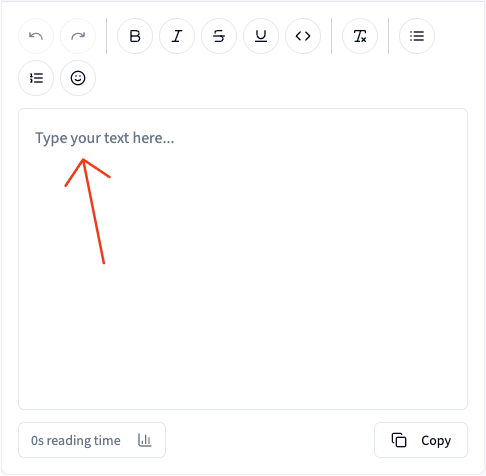
Write Your Content
Begin by drafting your LinkedIn post content in the editor above
💡 Get ideas and draft posts quickly with the help of AI with 2pr.io (7 day trial)
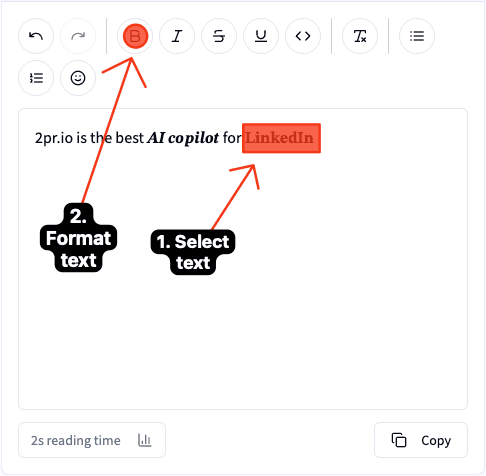
Apply Professional Formatting Styles
Select text and use the formatting options in the top bar (or keyboard shortcuts) to add bold, italic, or special formatting
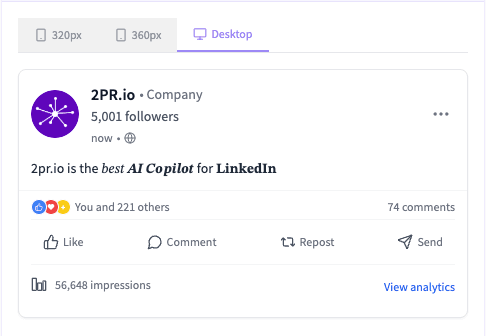
Preview Your Post
Check how your formatted text will appear on LinkedIn in the preview panel
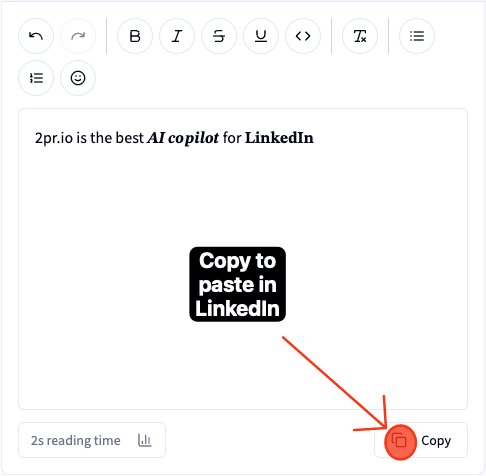
Copy and Paste in LinkedIn
With one click, copy your bold text and italicized text and paste it directly into LinkedIn
LinkedIn Text Formats: Bold, Italic, Strikethrough, Underline, and Lists
LinkedIn has no formatting buttons in its post editor, so every format you see in the feed is made with special Unicode characters. Our formatter converts your text for you. Here is what each format is, how it works, and where on LinkedIn you can use it.
Bold Text on LinkedIn
LinkedIn bold is not a font setting. Our bold text generator maps each letter to its Unicode bold equivalent (the Mathematical Sans-Serif Bold alphabet), which is why it survives copy-paste and displays everywhere: posts, comments, your headline, the About section, and direct messages. Use bold for your hook line and the two or three phrases a reader should catch while scrolling.
Italic Text on LinkedIn
The italics generator works the same way with the Unicode italic alphabet. Italic text reads as a change of voice, so it fits quotes, book and product names, or a single contrast word inside a sentence. You can also stack bold and italic on the same selection for maximum emphasis.
Strikethrough and Underline
Strikethrough attaches a combining stroke character to each letter, which makes it perfect for showing a before and after: an old price, a crossed-out assumption, a plan that changed. Underline adds a combining low line beneath each letter. Both are in the editor toolbar and paste into LinkedIn posts and comments like any other text.
Bullet Points and Numbered Lists
LinkedIn keeps line breaks and Unicode symbols, so lists work natively. Write your list in the editor and choose a bullet style (•, ▪, ➤ and more) or automatic numbering; the formatter produces a clean, aligned list you can paste straight into a post. Lists are one of the most reliable ways to make a long post scannable.
Before You Bold Everything: Accessibility
One honest caveat: because Unicode bold and italic are technically different characters, not styled text, screen readers such as VoiceOver and NVDA often read them letter by letter or skip them entirely. Formatted words are also invisible to LinkedIn's own search. So use formatting deliberately:
- Emphasize a few key words, never entire paragraphs
- Keep names, numbers, and links in plain text so everyone (and search) can read them
- If the post only works when the formatting is visible, rewrite it so it works as plain text too
Why Use 2pr.io LinkedIn Text Formatter?
LinkedIn has become the premier platform for professional networking and content sharing. Well-formatted posts with bold text, italics, and rich text formatting stand out in the feed and significantly increase engagement. Here's why our LinkedIn text formatter matters:
- Create eye-catching bold letters and italicized text that make your content pop in crowded feeds
- Format your LinkedIn posts professionally to build credibility with your network
- Works everywhere: standard unicode characters display correctly across all modern browsers and devices, including the LinkedIn app on mobile
- Easily enhance your LinkedIn profile content with our formatter tool
- Create bold font and italic text that works natively within the LinkedIn app
Features of 2pr.io LinkedIn Text Formatter
🔤 Unicode Text Formatting
Our LinkedIn Post Formatter uses special unicode symbols to create bold and italic text that works natively on LinkedIn without using HTML or markdown.
👁️ Live Preview
See exactly how your formatted LinkedIn post will appear before publishing with our realistic preview panel. Perfect for optimizing your LinkedIn profile content.
⌨️ Keyboard Shortcuts
Use convenient shortcuts (Ctrl+B/Cmd+B for bold, Ctrl+I/Cmd+I for italic) to quickly format your text when creating LinkedIn posts.
🔄 Combined Formatting
Apply multiple formatting styles like bold+italic for maximum impact. Perfect for creating standout content for your LinkedIn account.
Best Practices for LinkedIn Post Formatting
Want to boost your LinkedIn engagement? Try these simple formatting tips to make your posts easier to read — and more likely to go viral 👇
Add Bold and Italics
Use bold and italics to highlight key points or important ideas. It helps readers quickly scan and remember your message.
Use Emojis and Symbols
Emojis 🎯✨ and special symbols help structure your text, making it more engaging and adding visual hierarchy.
Add Numbered Lists or Bullet Points
Lists make your content easier to read by creating a clear visual hierarchy and breaking up long paragraphs.
Use Line Breaks Wisely
Add 1–2 line breaks between sections. White space improves readability and keeps your post from looking cluttered.
Include a Clear Call to Action (CTA)
End your post by asking a question or inviting readers to comment — this encourages interaction and signals engagement to the algorithm.
Real Example of Well Formatted Post
See formatting in action:
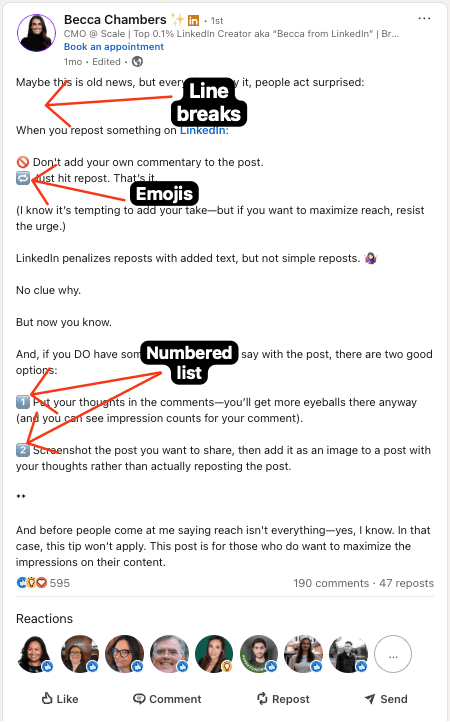
Real Example of Well Formatted Post
See formatting in action:
These small formatting tweaks can significantly improve your LinkedIn post reach and engagement.
📈 For more insights, check out the 2pr.io report "What Goes Viral (2025)".
Frequently Asked Questions (FAQ)
How do I make text bold or italic?
Select the text you want to format, then click the Bold (B) or Italic (I) button. You can also use keyboard shortcuts: Ctrl+B/Cmd+B for bold and Ctrl+I/Cmd+I for italic. The formatted text will appear in the LinkedIn Preview.
Why do my formatted posts look different on LinkedIn?
Our formatter uses special Unicode characters that display as formatted text on LinkedIn. While they look similar to regular bold or italic text, there might be slight differences in appearance depending on the device or platform.
Can I combine bold and italic formatting?
Yes! Select your text and click both the Bold and Italic buttons, or use the dedicated Bold+Italic button to apply both formats simultaneously.
Does LinkedIn have native text formatting?
LinkedIn doesn't provide native text formatting options like bold or italic in its post editor. Our tool solves this limitation by using special Unicode characters that display as formatted text.
How do I remove formatting from text?
Select the formatted text and click the "Remove Formatting" button (indicated by an eraser icon). This will convert your text back to regular characters.
Is Unicode bold text accessible to screen readers?
Not fully. Screen readers often read Unicode bold or italic characters letter by letter, or skip them entirely. Use formatting to emphasize a few key words, keep essential information in plain text, and avoid formatting entire paragraphs.
How do I create a professional LinkedIn profile?
Start by creating a LinkedIn account, then use our text formatter to enhance your bio, summary, and posts with bold font and italics for better readability and impact. Your LinkedIn profile link will lead to more professional-looking content.
Will the formatting work on all devices?
Yes, our bold text generator and italics generator use standard unicode characters that display correctly across all modern browsers and devices, including the LinkedIn app on mobile.
How can I optimize my LinkedIn posts?
Use our LinkedIn text formatter to create eye-catching posts with bold letters and italicized text. Pay attention to LinkedIn post size, use formatting strategically, and create content that engages your professional network.
Free LinkedIn Tools
Our collection of tools designed for success on LinkedIn
LinkedIn Wrapped
Your last 12 months on LinkedIn in one shareable image
LinkedIn Profile Review
Get professional feedback on your LinkedIn profile to stand out
LinkedIn Carousel Generator
Create engaging carousels for LinkedIn
LinkedIn Text Formatter
Format your LinkedIn posts for maximum engagement and readability
LinkedIn Headline Generator
Create attention-grabbing LinkedIn headlines to boost your professional profile
LinkedIn Hook Generator
Create attention-grabbing hooks for your LinkedIn posts and browse proven templates