
Free LinkedIn Hook Generator
Create attention-grabbing hooks for the first 3 lines of your LinkedIn posts to stop the scroll and boost engagement.
Create your hook
Enter your theme or draft post below to generate hooks
No signup required
How to Use 2pr.io LinkedIn Hooks Generator
Our LinkedIn Hooks Generator makes it simple to create attention-grabbing post openings that drive engagement:
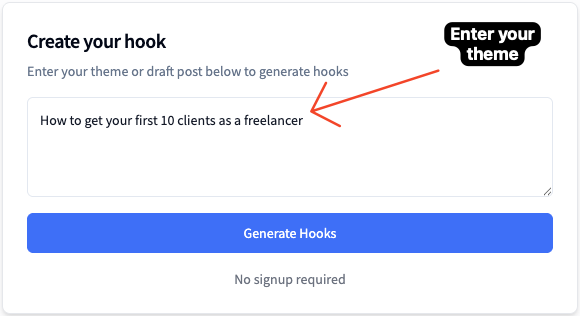
Enter Your Topic or Idea
Start by typing your post topic, key message, or the main idea you want to share on LinkedIn in the input field above
💡 Be specific! The more context you provide, the better your generated hooks will be. For example: "How to get your first 10 clients as a freelancer" instead of just "freelancing"
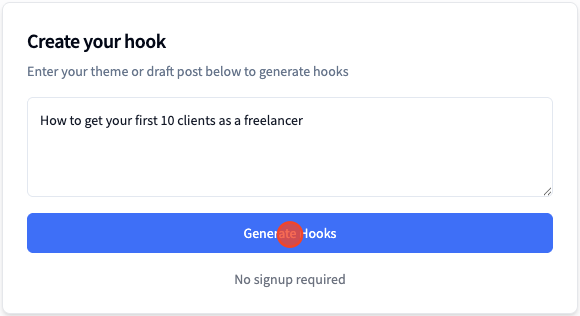
Generate AI-Powered Hooks
Click the "Generate Hooks" button and let our AI create multiple engaging hook options tailored to your topic. You'll get 5-10 different hooks to choose from
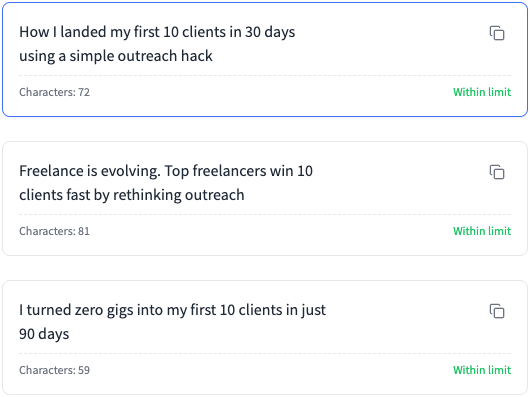
Browse and Select Your Favorite
Review the generated hooks in the table below. You can also explore our LinkedIn Hooks Library with proven templates from top creators
📚 Use the library filters to find hooks by type (Question, Stat, Story, etc.) or by creator
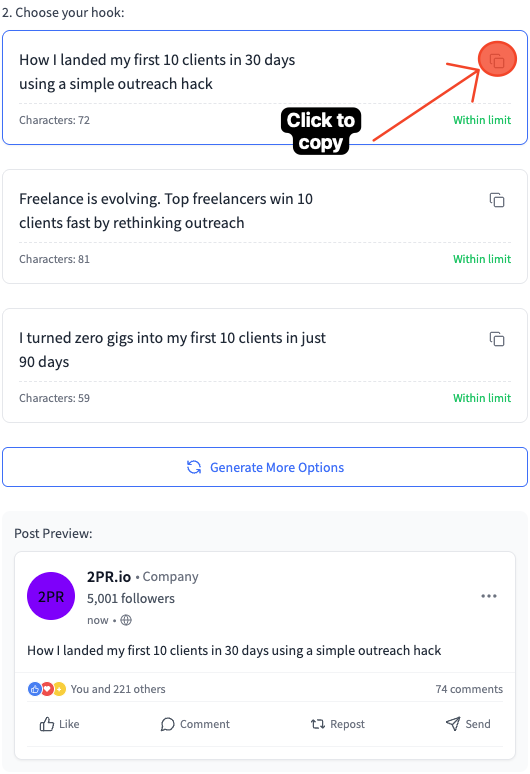
Copy and Use in Your LinkedIn Post
Click the copy button next to your chosen hook and paste it as the opening line of your LinkedIn post. Customize it to match your voice and style!
Why Use 2pr.io LinkedIn Hooks Generator?
The first line of your LinkedIn post is crucial - it determines whether people will stop scrolling and read your content. A powerful hook can be the difference between a post that flops and one that goes viral. Here's why our LinkedIn hooks generator matters:
- Create attention-grabbing hooks that make readers stop scrolling and engage with your content
- Access a library of proven templates from successful LinkedIn creators
- Generate multiple hook options instantly with AI instead of spending hours brainstorming
- Increase your LinkedIn post engagement with hooks designed to spark curiosity
- Learn from the best by studying different hook types: Questions, Stats, Stories, Bold Statements, and more
Features of 2pr.io LinkedIn Hooks Generator
🤖 AI-Powered Generation
Our AI hooks generator creates custom hooks tailored to your specific topic, saving you time and giving you fresh ideas.
📚 Proven Templates Library
Browse a curated collection of LinkedIn hook templates used by top creators with millions of views.
🎯 Multiple Hook Types
Access different hook styles - Questions, Stats, Stories, Bold Statements, How-To, and more - to keep your content fresh.
⚡ Instant Copy
One-click copy makes it easy to grab any hook and paste it directly into your LinkedIn post.
Types of LinkedIn Hooks That Work
Understanding different hook types helps you choose the right approach for your content. Here are the most effective LinkedIn hook formats:
❓ Question Hooks
Start with a thought-provoking question that makes your audience think.
Example: "Want to 3x your LinkedIn engagement in 30 days?"
📊 Stat Hooks
Lead with a surprising statistic or number that demands attention.
Example: "95% of LinkedIn users never post. Here's why that's a massive opportunity..."
📖 Story Hooks
Open with a personal story or anecdote that creates curiosity.
Example: "I spent $10,000 on LinkedIn ads before learning this one simple trick..."
💪 Bold Statement Hooks
Make a controversial or counterintuitive claim that challenges conventional wisdom.
Example: "Posting every day on LinkedIn is killing your growth. Here's what to do instead."
🎓 How-To Hooks
Promise to teach something valuable with a clear outcome.
Example: "How I gained 10,000 followers in 60 days (and you can too)"
Mix different hook types to keep your content fresh and engaging. Test what resonates best with your audience!
💡 Need help writing complete posts? Try 2pr.io's AI Post Generator (7 day trial)
What Makes a Great LinkedIn Hook?
A LinkedIn hook is the first 3 lines of your post that appear before the "...see more" button. These opening lines are crucial because they determine whether readers will engage with your content or scroll past. The perfect LinkedIn hook captures attention immediately, creates curiosity, and compels readers to click "see more" to continue reading.
Effective hooks typically include one or more of these elements: a bold statement, a surprising fact, a counterintuitive idea, a compelling question, or the promise of valuable information. Since LinkedIn only displays about 3 lines before truncating your post, every character counts.
Why Your LinkedIn Hook Matters
In a fast-scrolling feed environment, you have mere seconds to capture attention. LinkedIn's algorithm also measures initial engagement (including clicks on "see more") to determine how widely to distribute your content. A strong hook can dramatically increase your post's reach and engagement.
According to LinkedIn's internal data, posts that receive engagement in the first hour are much more likely to be shown to a wider audience. Your hook is what drives that initial engagement, making it perhaps the most important part of your entire post.
Hook Formulas That Work on LinkedIn
1. The Contrarian Hook
Start with a statement that challenges conventional wisdom in your industry. This immediately signals that your post offers a fresh perspective worth reading.
After analyzing 1,000+ viral posts, I discovered what actually works.
The truth might surprise you:"
2. The Results Hook
Lead with specific, impressive results to establish credibility and create interest in how those results were achieved.
Without posting daily. Without paid ads. Without any gimmicks.
Here's exactly what I did:"
3. The Mistake Hook
Highlight a common mistake that your audience might be making. This creates immediate relevance and a desire to avoid the error.
They focus on followers instead of this ONE metric.
Fix this immediately if you want real results:"
Ready to Create Scroll-Stopping LinkedIn Hooks?
Enter your topic above and click "Generate Hooks" to create attention-grabbing openings for your LinkedIn posts. Transform your engagement rates with hooks that make readers stop and pay attention.
Our free tool helps you craft the perfect first 3 lines for any LinkedIn post, designed specifically to increase your "see more" clicks and overall engagement.
Frequently Asked Questions
What exactly is a LinkedIn hook?
A LinkedIn hook refers specifically to the first 3 lines of your post that appear before the "see more" button. On mobile devices (which account for over 57% of LinkedIn traffic), this is typically just 2-3 lines of text.
How many characters should a LinkedIn hook be?
For optimal display across devices, aim to keep your hook under 220 characters. This typically ensures your key message appears before the "see more" button on most devices.
Should I use emojis in my LinkedIn hooks?
Used strategically, 1-2 relevant emojis can make your hook stand out in the feed. However, overusing emojis can make your content look unprofessional. Consider your audience and industry norms.
How often should I change my hook style?
Variety keeps your content fresh, but consistency helps build recognition. A good approach is to have 3-5 hook formulas that work well for you and rotate between them.
Free LinkedIn Tools
Our collection of tools designed for success on LinkedIn
LinkedIn Wrapped
Your last 12 months on LinkedIn in one shareable image
LinkedIn Profile Review
Get professional feedback on your LinkedIn profile to stand out
LinkedIn Carousel Generator
Create engaging carousels for LinkedIn
LinkedIn Text Formatter
Format your LinkedIn posts for maximum engagement and readability
LinkedIn Headline Generator
Create attention-grabbing LinkedIn headlines to boost your professional profile
LinkedIn Hook Generator
Create attention-grabbing hooks for your LinkedIn posts and browse proven templates