
When to use AI agents vs simple LLM workflows
June 23, 2026
TL;DR
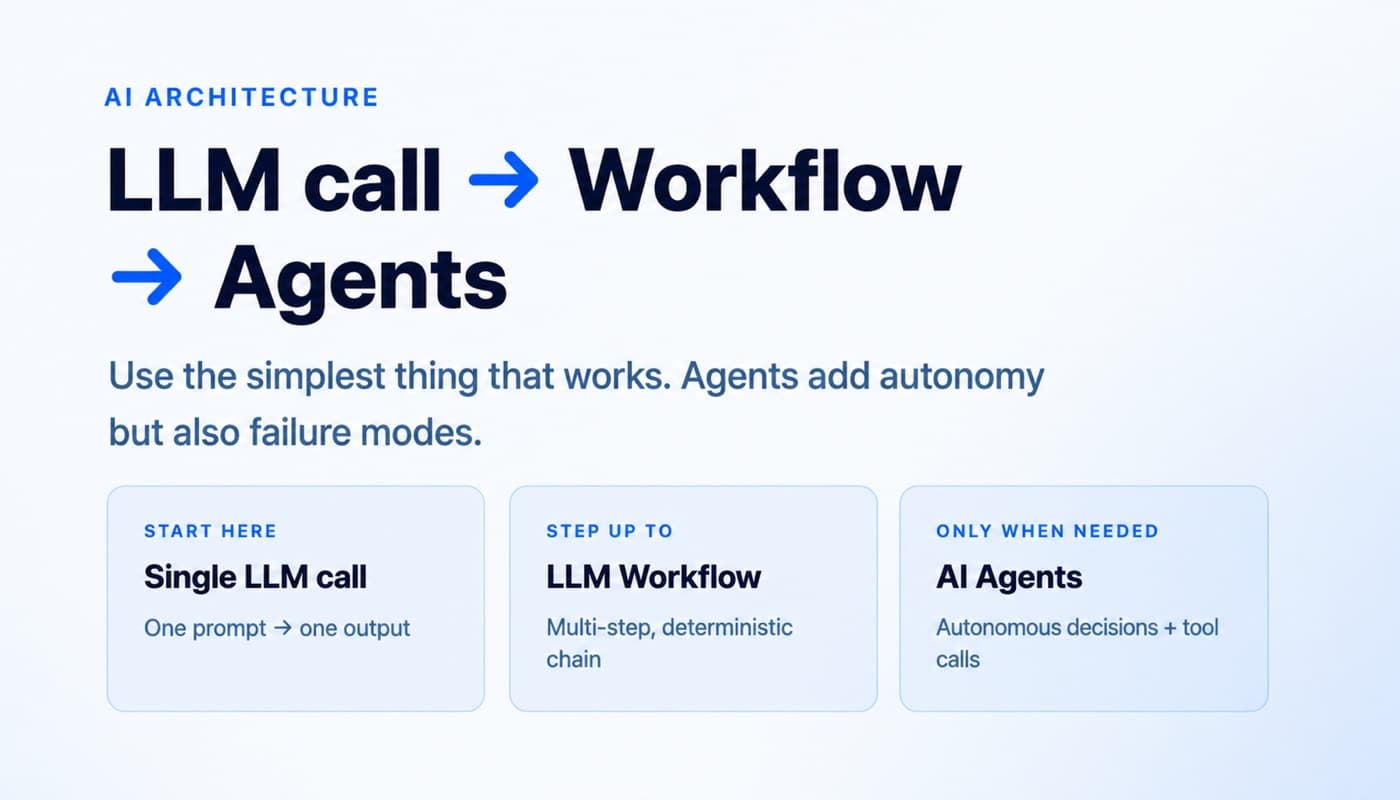
If you're asking when to use AI agents vs workflows, here's the short answer: start with a single LLM call, move to a workflow when the task is multi-step but predictable, and use an agent only when the system must make decisions in real time under ambiguity. Most teams reach for agents too early. In practice, a basic prompt with retrieval, examples, and a clear output format solves far more than people expect. Workflows are useful when the path is known. Agents are useful when the path is not known in advance.
Why most people reach for agents when they need a workflow
I keep seeing the same mistake.
A team has a task that feels "complex," so they assume they need an agent. What they actually need is a sequence of steps with clear handoffs: classify, retrieve, draft, check, return.
The reverse mistake also happens. Someone forces a rigid workflow onto a task that is inherently messy. The inputs vary, the tools vary, the order of operations changes, and the model has to decide what to do next. That is where a real agent can make sense.
The problem is that "agent" sounds more advanced, and "workflow" sounds less impressive. Founders often optimize for narrative instead of system design. That is expensive.
My default view is simple: complexity is not sophistication. Complexity is a tax. You only pay it when the return is real.
The three tiers: single LLM call / workflow / agent
I think about AI systems in three tiers.
1/ Single LLM call
One prompt in, one output out.
You can make this much stronger than people assume by adding retrieval, examples, output constraints, and maybe a schema. This is still one call. It is still simple.
2/ Workflow
A workflow is a predefined path.
The model does one step, then another, then another. Or you route the input to one of several branches. Or you run a few calls in parallel and merge the result. The logic is coded by you, not invented by the model on the fly.
3/ Agent
An agent directs its own process dynamically.
It decides which tool to use, in what order, whether to ask a follow-up question, whether to search, whether to retry, whether to branch, and when it is done. The path is not fully predetermined.
That distinction matters more than the UI or framework.
If the system follows predefined code paths, it is a workflow. If the model is deciding the process itself, it is an agent.
When a single LLM call is enough
Most use cases should start here.
If the task is mostly transformation, extraction, summarization, rewriting, classification, or generation from known context, a single call is usually enough.
Examples:
- Rewrite a LinkedIn post in a sharper tone
- Summarize 10 customer interviews into themes
- Extract fields from a sales call transcript
- Classify inbound leads by intent
- Draft 5 headline variants from a product page
- Turn raw notes into a FAQ
At 2pr.io, a lot of content use cases look complicated from the outside. In reality, many are just well-scoped prompt problems. If you have the right context, a few examples, and strong output rules, you can get very far without orchestration.
A single call is enough when:
- The input is well-bounded
- The output format is known
- You do not need intermediate decisions
- Failure is easy to detect manually or with light validation
- Latency matters
This is also the easiest setup to improve. You can tune the prompt, add examples, improve retrieval, tighten the schema, and measure outputs quickly.
Most teams skip this stage and leave performance on the table.
When you need a workflow: multi-step, predictable, deterministic
You need a workflow when one prompt starts doing too much at once.
Not because the task is "intelligent," but because it has multiple stages that benefit from separation.
Classic workflow patterns:
- Prompt chaining
- Routing
- Parallelization
- Orchestrator-worker setups with fixed boundaries
- Evaluator-optimizer loops
These patterns work because they make the process visible.
For example, say you are processing support tickets.
A clean workflow might be:
- Detect issue type
- Retrieve account or product context
- Draft a response using the right template
- Run a policy or tone check
- Send or escalate
Nothing about that requires an agent. It requires structure.
Or take content operations:
- Analyze source material
- Extract core claims
- Build an outline
- Draft the article
- Run a style pass
- Check for unsupported claims
Again, predictable path, predictable steps, better as a workflow.
Use a workflow when:
- The task has multiple stages with different prompts
- You want control over order of operations
- You need deterministic branching
- You need auditability and debugging
- You want to mix LLM steps with rules-based logic
This is where many real production systems should live.
In customer support and coding, I consistently see workflows outperform agent hype. The success criteria are clearer, the tooling is testable, and the failure modes are easier to contain.
When you actually need an agent: ambiguous tasks, real-time decisions, external tool use
Agents are useful. They are just rarer than the market suggests.
You need an agent when the system cannot know the exact path in advance.
That usually means three things are true at the same time:
- The task is ambiguous
- The system must choose among tools or actions dynamically
- The next best step depends on what just happened
Examples:
- A research assistant that decides whether to search the web, inspect documents, compare sources, and ask clarifying questions
- A coding system that explores a codebase, runs tests, debugs failures, and changes strategy based on outputs
- An ops assistant that investigates a production issue across logs, tickets, and database state, then decides what to inspect next
Notice what these have in common. The model is not just generating text. It is managing a process under uncertainty.
That is agent territory.
You probably need an agent when:
- You cannot predefine the full sequence reliably
- Tool choice changes from case to case
- The model must react to environment feedback
- The task may loop until a goal is met
- Asking follow-up questions materially improves results
Even here, I prefer constrained agents over open-ended ones.
Give them limited tools. Make planning visible. Log every action. Add stop conditions. Test the tools aggressively. Measure success at the task level, not the demo level.
The founders who get value from agents are not the ones chasing autonomy. They are the ones setting boundaries.
The cost of over-engineering: latency, debugging complexity, failure modes
Every extra layer has a cost.
A single LLM call fails in relatively obvious ways. The answer is bad, incomplete, or off-format. You can inspect the prompt and fix it.
A workflow introduces handoff problems. Maybe classification was slightly wrong, which poisoned retrieval, which weakened the draft, which caused the final check to pass a flawed answer.
An agent adds a different class of problems:
- More latency
- More tokens
- More places for the system to get stuck
- Harder reproducibility
- Harder debugging
- More tool-related failures
- More weird edge cases
I have seen founders celebrate a beautiful agent demo that quietly costs 20 times more, runs 5 times slower, and breaks in ways nobody can explain.
That is not leverage. That is fragility with a good narrative.
The deeper issue is operational. If your team cannot understand why the system took a path, you cannot improve it systematically. You are left poking at prompts and hoping.
My bias is simple: use the least powerful architecture that reliably solves the problem.
A practical decision checklist
When I evaluate a use case, I ask these questions in order.
1/ Can one well-designed prompt solve it?
Before building anything multi-step, test the obvious version.
Add:
- Good context
- Few-shot examples
- Output constraints
- Retrieval if needed
- A simple validation layer
If this gets you 80 to 90 percent of the way, keep it simple.
2/ Is the task multi-step but predictable?
If yes, use a workflow.
Write out the path explicitly. Decide where routing happens. Decide what is deterministic and what is model-driven. Add logging between steps.
3/ Does the system need to decide what to do next?
If yes, you may need an agent.
But be strict. "The task is hard" is not enough. The key question is whether the process itself must be dynamic.
4/ Do I need tools, or just better context?
Many teams say they need agents when what they really need is retrieval.
If the model already has everything it needs in context, tool use may be unnecessary. Tool use becomes valuable when the system must fetch fresh information, inspect an environment, or take actions.
5/ What happens when it fails?
Design backward from failure.
If a mistake is cheap and visible, you can tolerate more model freedom. If a mistake is expensive or hidden, keep the system tighter.
6/ Can my team debug this in production?
This question kills a lot of bad ideas.
If nobody can trace what happened, do not ship the more complex architecture yet.
FAQ
What is the difference between an AI workflow and an AI agent?
A workflow follows predefined steps that you code in advance. An agent decides the next step dynamically based on the goal, the current state, and tool outputs. If the path is fixed, it is a workflow. If the path emerges during execution, it is an agent.
Are AI agents better than workflows?
No. They are more flexible, not automatically better. If the task is predictable, workflows are usually cheaper, faster, and easier to debug. Agents become better only when the task genuinely requires dynamic decisions under uncertainty.
How do I know if I only need a single LLM call?
Try it first. If one prompt with retrieval, examples, and output constraints produces reliable results, stop there. Most content, extraction, summarization, and rewriting tasks do not need orchestration. They need better prompt design and better context.
What are examples of tasks that need agents?
Open-ended research, debugging complex software, multi-tool investigation, and tasks where the system must adapt its plan in real time are strong candidates. The common pattern is that you cannot know the exact sequence of actions before the task starts.
Why do so many teams overbuild agent systems?
Because "agent" sounds like product progress, while "prompt plus workflow" sounds basic. But users do not care how advanced your architecture sounds. They care whether it is fast, reliable, and useful. Founders should optimize for that, not for the most impressive diagram.
More LinkedIn guides
The Best Day to Post on LinkedIn (2026 Data)
We ranked 10,000 recent LinkedIn posts by reach. Sunday and Monday win, Wednesday loses. Here is the day-by-day data and how to use it.
June 22, 2026How a Toronto pharmacist went from 88 to 7,203 views per post on LinkedIn
A real LinkedIn case study. Alexandre Mihaila runs an online pharmacy in Toronto, not a B2B SaaS or a creator brand. His average post went from 88 views to 7,203 views, up to 80x more reach, without changing his topics or chasing a trendy niche.
September 18, 2026LinkedIn's Network tab: what the feed split means
LinkedIn split the feed into For You and Network tabs. Here is what the change does, why it happened, and what it means for creators.
Grow on LinkedIn with 2pr
Ideas, AI drafts in your voice, carousels, scheduling, and analytics: one tool. Start your free trial.
Start free trial